You’ve heard the term by now. Vendors use it in every pitch, your peers mention it at events, and someone on your team has forwarded an article about it. Yet if you were asked to point to one inside your own company, you’d struggle. So, what is an AI agent, and where would one fit in a business your size?
This guide gives you a plain answer, breaks an agent into its parts and follows one through a working morning on a purchasing desk. You’ll also see where people stay in control and how to start with a single workflow.
What Is an AI Agent in Plain Terms?
An AI agent is software that takes a defined piece of work from start to finish. It uses an AI model to interpret information, decide what to do next, take action through connected tools and adjust its next step based on what happens. The limits come from you, and when a case needs judgment, the agent hands it to a person.
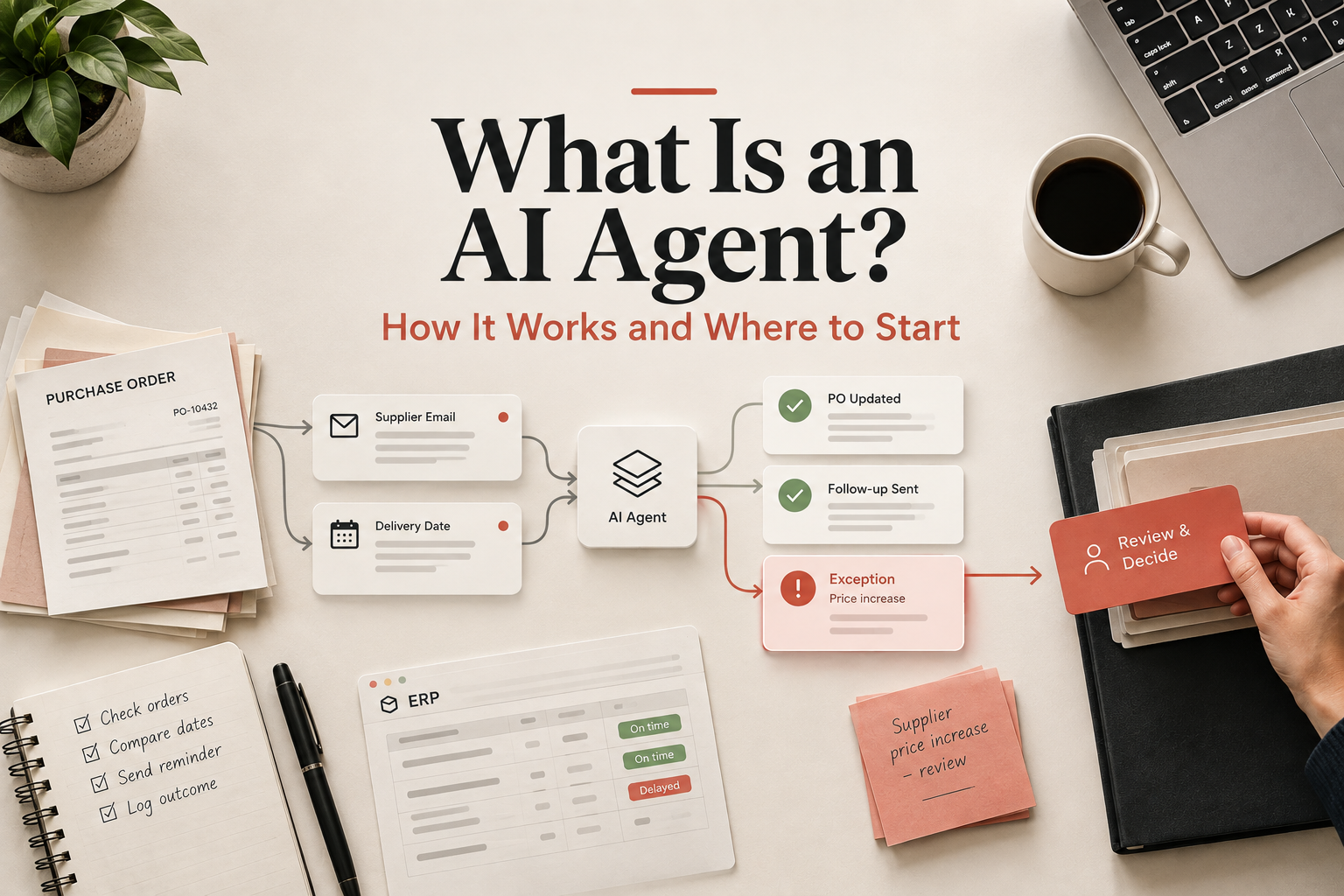
Think of any task your team already runs from a checklist. Check the order. Compare the dates. Send the reminder. Log what happened. An agent works through that checklist inside your systems, at any hour. When it reaches a case the checklist doesn’t cover, it hands the case over. Your team keeps the decisions, and the repetition moves off their desks.
Most people picture a chat window when they hear “AI.” A chatbot answers a question and waits for the next one. An agent keeps going until the job is done.
What Makes Up an AI Agent?
An AI agent brings five working parts together.
- AI model: interprets information and helps determine what to do next.
- Context and data: gives it the relevant records, history and business information.
- Tools: let it take action inside your systems.
- Instructions and guardrails: define what it can do and where it must stop.
- Human handover: gives a person control when judgment is needed.
Put together, an AI agent is a model connected to your business information and tools, working within instructions and permissions you control.
How Do AI Agents Work?
An agent works in a continuous loop of five steps: understand, decide, act, check and escalate.
It first gathers the information relevant to the task. The right information matters more than access to everything. It then uses that context and your instructions to decide what to do next. It takes the appropriate action through its connected tools, checks the result and decides whether another step is needed.
If the situation falls outside its instructions or is too uncertain to handle safely, it stops and hands the case to a person. The person gets a summary of what happened and what the agent suggests, makes the decision, and the agent can continue from there.
This is called a human-in-the-loop approach. The agent handles the routine work, and a person stays responsible for decisions that need judgment or authority.
A Worked Example: Chasing Late Purchase Orders
The easiest way to answer “what is an AI agent?” is to watch one handle a real piece of work. Here is a morning on a purchasing desk.
Consider a distributor with around forty open purchase orders and the buyer who looks after them. Much of her role rests on judgment calls. She decides which suppliers to lean on, when to push back on a price and how to protect a promise made to a customer. Yet her first hour each morning goes to finding late orders and writing chasers.
An agent takes over the repetitive part of that hour. It has access to the purchasing system, the buyer’s mailbox and the company’s rules for supplier follow-ups. At 7 a.m. it reads the open POs and checks the status, recent correspondence and promised delivery date on each late one.
Then it chooses. If a supplier has already confirmed a new date that still meets the customer’s requirement, the agent updates the record and leaves the supplier alone. If the date is unclear, it sends a short, polite follow-up from the buyer’s mailbox asking for a confirmed ship date, then logs a note in the ERP. If the delay threatens a customer commitment, or a reply brings a higher price, it stops and flags the case to the buyer with a summary.
By the time the buyer sits down at nine, the follow-ups have gone out and two cases are waiting for her. One is a price increase she’ll want to push back on. The other is a delayed shipment that could miss a customer’s deadline, so it needs a call. An hour of admin has become ten minutes of review, and the rest of her morning goes to the decisions only she can make.
Where Can AI Agents Be Used?
The natural follow-up is where an agent can help. Agents suit processes with repeated work, several systems and clear boundaries. Each of these is a candidate workflow, and in each one people keep the decisions.
- Finance: check invoices against orders, chase overdue payments and route exceptions to accounts.
- Sales: research leads, update CRM records, prepare follow-ups and flag accounts that need attention.
- Customer service: gather details, sort requests, draft replies and escalate unusual cases.
- Operations: track deliveries, flag delays and prepare the daily exceptions list.
- HR and internal operations: answer routine policy questions, collect documents and route requests.
Human Oversight: Where People Stay in Control
A second question matters just as much: who stays in charge? You do. The aim is to give the agent the decisions it can handle safely and keep the rest with your team.
Pricing stays with people. An agent can note that a supplier has raised a price. It doesn’t agree to the new number or counter it. Approvals stay with people too. Anything above a spending limit you set goes to whoever holds that authority.
Permissions set the outer edge. An agent gets access only to the systems and actions its workflow needs. A PO follow-up agent might read purchase orders and send supplier emails, with no ability to change supplier pricing or approve payments. Owners ask whether connecting an ERP to an agent lets it change everything. It can change only what its permissions allow.
Exceptions matter most. Every process has cases that break the pattern: a new supplier, an odd contract term, a customer with special arrangements. The agent is set up to recognise when it has left its brief and to pass the case on. When it’s unsure, it asks.
Start with supervised autonomy
Trust builds in stages.
- Stage 1: the agent drafts each message and a person approves it.
- Stage 2: the agent handles routine cases and a person reviews the exceptions.
- Stage 3: the agent handles defined cases on its own, with ongoing monitoring.
Review a sample of its work every week. Every action is logged, so you can see what it did and why. Move to the next stage after a month of drafts that needed no correction.
How to Start With One Workflow
For a business owner, the more useful question is: what could an agent do for us? A short consultation call can answer that by showing where one fits in your operations. Bring a process that eats hours every week, and you’ll leave knowing whether an agent suits it.
Pick one workflow. Good first candidates repeat often, follow clear rules, have an obvious finish line and cost someone real hours each week. PO follow-up qualifies. So does invoice matching. Resist the urge to launch AI across every department at once.
Before you build anything, measure the current state. Record the hours the workflow takes each week, the number of cases, the average turnaround, the rework rate and how many cases need an exception. Those numbers become your baseline.
Then work in this order. Write down how the process runs today, including the points where someone has to make a call. Those notes become the instructions and the handover points. Run the agent alongside your team for a few weeks, with someone reviewing its work. Measure the same numbers again. Compare the two sets, and you’ll know whether the agent earned its place. Then choose the next workflow.
Keep the first project small enough to judge within a month. A small win is easy to explain to your team, and it gives you real numbers for the next decision.
Your Next Step
If you’re considering an AI agent for your business, start with the workflow. Map the steps, note the exceptions and measure the time involved. That page of notes shows whether an agent suits the work and what it should be allowed to do. If you have a workflow in mind but aren’t sure whether an agent is the right fit, we can help you map it before you build anything.
Frequently Asked Questions
What is an AI agent?
An AI agent is software that uses an AI model to interpret information, make decisions within defined boundaries, use connected tools and complete multi-step tasks. It can hand work to a person when a situation falls outside its instructions or requires human judgment.
How is an AI agent different from a chatbot?
A chatbot answers questions in a conversation. An agent owns a task. It gathers information, uses tools to act in your systems, works through several steps and escalates when needed.
Can an AI agent make decisions?
Yes, within limits you define. It can choose between routine actions, such as whether to send a follow-up. Higher-risk decisions, such as pricing or payment approval, can require a person’s sign-off.
Can an AI agent work with my existing business software?
In most cases, yes. Agents connect to tools such as email, ERP and CRM through integrations, and each connection carries its own permissions.
Where should a business start with an AI agent?
With one repetitive workflow that has clear boundaries and a finish line you can measure.