Custom AI agent development works best when it begins with one workflow your team already runs every day. If you are an owner or operations head thinking about a build, this post explains what actually happens, what you need to provide and what an agent costs to run once it is live.
Start with one mapped workflow
Most agent projects go wrong at the very first step. Someone picks a tool, then looks for a problem to point it at. A better order is to pick the work first.
Good candidates are tasks that follow the same rules every day and eat up hours: chasing information across emails and spreadsheets, answering the same customer questions, updating records so nothing slips. We sit with the people who do this work and map how it runs today. Who starts it, which systems it touches, where it gets stuck, and which steps need a person’s judgment.
That map becomes the brief for everything that follows.
Our process for custom AI agent development
A build follows a fixed sequence, and mapping the workflow is the first step.
- Map the workflow. The work described above, finished with one agreed measure of success, such as time per task or response time.
- Decide who does what. We mark the steps the agent can handle and the steps that stay with a person.
- Build. The agent is developed around your business rules and connected to the systems you already use.
- Test. We run it on sample data first, then on real tasks, and review the results with your team.
- Train. The people who will work alongside the agent learn how to use it, check it and correct it.
- Expand. Once the first workflow proves its value, we extend the agent to the next one.
We keep the first phase small on purpose. One workflow is enough to show whether the approach works for your business, and it keeps the risk low.
Designing the approval workflow
An agent should never be a black box that acts on its own authority. The most important design decision in any build is where the agent stops, and a person takes over.
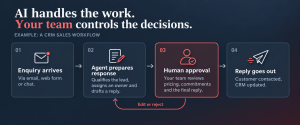
Take a sales agent. It can qualify a new enquiry, route it to the right salesperson and draft a follow-up. Pricing, commitments and the final reply stay with your team. A support agent can answer routine questions from approved knowledge and summarise a case for handover, while complaints and refunds go to a person.
We agree these approval points before launch and write them into the agent’s rules. If your team wants the agent to send routine replies without review, you can switch that on later, once you have seen how it performs.
Guardrails that keep the agent on task
Every agent we build has four guardrails.
- A defined job. The agent has clear boundaries on what it does and what it leaves alone.
- Approved data only. It can reach only the systems and knowledge sources you have signed off.
- Agreed permissions. What it may do on its own is settled before launch, and anything outside that list needs a person.
- Human handoff. When a decision needs judgment, the agent passes the case to a named person with a short summary, so nobody starts from zero.
These are simple rules, and that is the point. They make the agent predictable, and a predictable agent is one your team will trust.
What you provide
A build moves quickly when four things are in place in week one: access to the relevant systems, sample data, approved knowledge sources such as policies or FAQs, and one person who can make decisions each week.
That last item matters more than it looks. Agents raise small questions all the time, such as which rule applies to an edge case. A single decision owner who can answer within a day keeps the project on schedule.
The rhythm: a demo in week one, live in weeks three to four
The first phase timeline is short.
In week one you see a working demo of the agent on your own workflow, using sample data. You can judge it before connecting any live system. Week two is implementation: the agent is connected to your systems, with approval points and access rules in place. In weeks three and four, we test it on real tasks, train your team, and go live on the agreed workflow.
Seeing something real in the first week changes the conversation. Instead of debating a proposal, you react to something that works.
Zoho for records, AWS for the agent
We build on two platforms, and each has a simple role.
Zoho is the system of record. Your leads, customers and tickets stay in Zoho CRM and Zoho Desk, and your teams keep working in tools they already know. Many businesses already pay for these licences, so they often don’t need to buy anything new.
AWS is the agent’s engine. The AI models run on Amazon Bedrock and are billed per use. The surrounding pieces are serverless, using AWS Lambda and API Gateway, so your team has no servers to manage. DynamoDB and S3 hold data and documents.
The result is an agent that works inside your existing records instead of asking you to move them somewhere new.
What it costs to run
Running costs are mostly AI model usage, and they stay low because you pay only for what the agent uses.
Here is an example workload. Take about 3,000 conversations a month, each using roughly 4,000 input tokens and 800 output tokens. At public list prices as of September 2026 (AWS US East region), a low-cost model such as Amazon Nova Lite comes to about US$1.30 a month. A stronger model, Amazon Nova Pro, for harder tasks, costs about US$17.30 a month. Most pilots land somewhere in that range, because routine steps can use the cheaper model and the stronger one is kept for work that needs it.
AWS Lambda compute is covered by the free tier at pilot volume. If you already have Zoho CRM or Desk licensed, there is no extra software cost. If it is not, Zoho licences run from ₹800 to ₹2,400 per user per month, billed annually.
These figures exclude GST and the usage of DynamoDB, S3 and API Gateway, which we estimate during scoping. AWS and Zoho set their own prices, and those can change.
Our own fee for the first phase is a fixed quote, given after a scoping call and agreed before work starts. Ongoing support afterwards is optional.
Choosing a partner
If you are comparing custom AI agent development companies in India, ask how they handle the unglamorous parts: workflow mapping, approval points, access rules, and integration with the systems you already run. Our own project files include a Zoho People rollout that cut manual appraisal effort by over 40% for a medical device company, and a serverless vendor CRM with approvals for a healthcare provider. Those were workflow automation projects, not AI deployments, but they are the groundwork an agent depends on.
If you are ready to explore custom AI agent development for your business, bring one workflow to a consultation. We will help you pick the right starting point and show you a working demo in week one.
Book an AI workflow consultation at https://sixtyonesteps.zohobookings.com/#/consultations